MobileDetectBundle
=============
Symfony 2.4.x-3.0.x bundle for detect mobile devices, manage mobile view and redirect to the mobile and tablet version.
Switch device view
------------------
For switch device view, use `device_view` GET parameter:
````
http://site.com?device_view={full/mobile/tablet}
````
Installation
------------
### Composer
#### For Symfony >= 2.4
Run command:
`composer require "suncat/mobile-detect-bundle:1.0.*"`
Or add to `composer.json` in your project to `require` section:
```json
{
"suncat/mobile-detect-bundle": "1.0.*"
}
```
and run command:
`php composer.phar update`
> For Symfony < 2.4 use `0.10.x` version of this bundle
### Add this bundle to your application's kernel
```php
//app/AppKernel.php
public function registerBundles()
{
return array(
// ...
new SunCat\MobileDetectBundle\MobileDetectBundle(),
// ...
);
}
```
### Full configuration
You can change default behaviour of your redirects with action parameter:
- `redirect`: redirects to appropriate host with your current path
- `no_redirect`: no redirection (default behaviour)
- `redirect_without_path`: redirects to appropriate host index page
```yaml
#app/config/config.yml
mobile_detect:
redirect:
full:
is_enabled: true # default false
host: http://site.com # with scheme (http|https), default null, url validate
status_code: 301 # default 302
action: redirect # redirect, no_redirect, redirect_without_path
mobile:
is_enabled: true # default false
host: http://m.site.com # with scheme (http|https), default null, url validate
status_code: 301 # default 302
action: redirect # redirect, no_redirect, redirect_without_path
tablet:
is_enabled: true # default false
host: http://t.site.com # with scheme (http|https), default null, url validate
status_code: 301 # default 302
action: redirect # redirect, no_redirect, redirect_without_path
detect_tablet_as_mobile: true # default false
switch_device_view:
save_referer_path: false # default true
# true redirectUrl = http://site.com/current/path?currentQuery=string
# false redirectUrl = http://site.com
service:
mobile_detector: mobile_detect.mobile_detector.default
cookie_key: "device_view" # default
cookie_expire_datetime_modifier: "+1 month" # default
switch_param: "device_view" # default
device_view_class: "SunCat\MobileDetectBundle\Helper\DeviceView"
request_response_listener_class: "SunCat\MobileDetectBundle\EventListener\RequestResponseListener"
twig_extension_class: "SunCat\MobileDetectBundle\Twig\Extension\MobileDetectExtension"
```
You can also create route specific rules for redirecting in your routing.yml.
Just add appropriate platform(s) to the options field and add a redirect rule.
```yaml
#routing.yml
someaction:
pattern: /someaction
defaults: { _controller: YourBundle:Index:someAction }
options: { mobile: redirect, tablet: no_redirect, full: redirect_without_path } # redirect, no_redirect, redirect_without_path
```
### Migration 0.10.x to 1.0.x config changes
* Change: `request_listener_class` for `request_response_listener_class`.
* Change: `extension_class` for `twig_extension_class`.
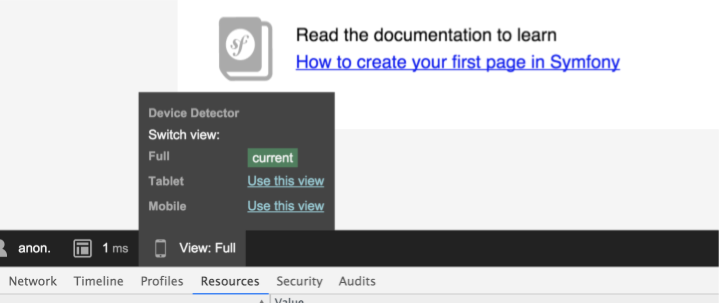
### Symfony toolbar
PHP examples
------------
### Check type device
``` php
$mobileDetector = $this->get('mobile_detect.mobile_detector');
$mobileDetector->isMobile();
$mobileDetector->isTablet()
```
### Check phone
**is[iPhone|HTC|Nexus|Dell|Motorola|Samsung|Sony|Asus|Palm|Vertu|GenericPhone]**
``` php
$mobileDetector->isIphone();
$mobileDetector->isHTC();
etc.
```
### Check tablet
**is[BlackBerryTablet|iPad|Kindle|SamsungTablet|HTCtablet|MotorolaTablet|AsusTablet|NookTablet|AcerTablet|
YarvikTablet|GenericTablet]**
```php
$mobileDetector->isIpad();
$mobileDetector->isMotorolaTablet();
etc.
```
### Check mobile OS
**is[AndroidOS|BlackBerryOS|PalmOS|SymbianOS|WindowsMobileOS|iOS|badaOS]**
```php
$mobileDetector->isAndroidOS();
$mobileDetector->isIOS();
```
### Check mobile browser User-Agent
**is[Chrome|Dolfin|Opera|Skyfire|IE|Firefox|Bolt|TeaShark|Blazer|Safari|Midori|GenericBrowser]**
```php
$mobileDetector->isChrome();
$mobileDetector->isSafari();
```
Twig Helper
-----------
```jinja
{% if is_mobile() %}
{% if is_tablet() %}
{% if is_device('iphone') %} # magic methods is[...]
{% if is_ios() %}
{% if is_android_os() %}
```
```jinja
{% if is_full_view() %}
{% if is_mobile_view() %}
{% if is_tablet_view() %}
{% if is_not_mobile_view() %}
```
```jinja
{{ full_view_url() }} # with current path and query. http://fullsite.com/current/path?param1=value1¶m2=value2
{{ full_view_url(false) }} # to configure host only (without /current/path?param1=value1¶m2=value2). http://fullsite.com
Full view
```
Twig examples
-------------
```jinja
{% extends is_mobile() ? "MyBundle:Layout:mobile.html.twig" : "MyBundle:Layout:full.html.twig" %}
```
```jinja
{% if is_mobile_view() %}
{% extends "MyBundle:Layout:mobile.html.twig" %}
{% else if is_tablet_view() %}
{% extends "MyBundle:Layout:tablet.html.twig" %}
{% else if is_full_view() or is_not_mobile_view() %}
{% extends "MyBundle:Layout:full.html.twig" %}
{% endif %}
```
```jinja
{% if is_device('iphone') %}
{% endif %}
```
```jinja
{% if is_mobile_view() %}
{% endif %}
```
Usage Example:
--------------
#### Setting up redirection to and from a mobile site that is the same Symfony 2 instance as your main site.
In this example, let's assume that you have a website http://site.com and you wish to activate
redirection to a mobile site http://m.site.com when the user is using a mobile device.
Additionally, when a user with a desktop browser reaches the mobile site http://m.site.com, he
should be redirected to the full version at http://site.com.
1. **Set up mobile redirection to your config.yml**
```yaml
mobile_detect:
redirect:
mobile:
is_enabled: true
host: http://m.site.com
status_code: 301
action: redirect
tablet: ~
switch_device_view: ~
```
Now when you hit http://site.com with a mobile device, you are redirected to http://m.site.com.
At this point if the http://m.site.com is configured to point to your project, you will get circular reference error.
To get rid of the circular reference error, we want to disable mobile redirecting when we land on our mobile site.
2. **Create a new `app.php` file with a name like, for example, `app_mobile.php` and change the following:**
```php
$kernel = new AppKernel('prod', false);
```
to:
```php
$kernel = new AppKernel('mobile', false);
```
Now your mobile site has its own environment and we can nicely create some custom configuration for it, disable
mobile redirecting and activate desktop redirection instead.
3. **Create `config_mobile.yml` next to your `config.yml` and disable mobile redirecting. This should take care of the circular
reference errors. Adding the `full` configuration activates desktop redirection.**
Also you might want to define your routing file as mobile specific. If you do, just create new `routing_mobile.yml`
file and use it just like the default `routing.yml`. This gives you nice opportunity to route requests to
custom mobile specific controllers that can render views that are designed for mobile. This way you don't need to write
platform specific conditions to your view files.
```yaml
framework:
router:
resource: "%kernel.root_dir%/config/routing_mobile.yml"
mobile_detect:
redirect:
mobile:
is_enabled: false
tablet: ~
full:
is_enabled: true
host: http://site.com
switch_device_view: ~
```
4. **Configure your http server: Make sure that in your http server virtual host, you make http://m.site.com use `app_mobile.php` as its script file
instead of `app.php`.**
After you have restarted your http server everything should work.
Also remember to clear the cache if you do changes to configs or you might end to get frustrated for nothing.